

An AI team for a shop of one
I designed and built an AI team of 14 roles for a small online business, and the dashboard she runs her shop from.
A freelance project since July, for a small online business run by one person. I set up her AI team in July, rebuilt it in August and grew it to 14 roles in September, and I designed and built the dashboard it works in. She writes to each role in her own words; the dashboard shows what’s done and what’s waiting on her.
- 14 roleseach in its own chat
- 5 tabsin one dashboard
- Every Mondayfresh shop stats
The owner says work that used to take her weeks now takes days.
August and September sales were 2.3 times the same two months last year
Same two months, a year apart, so the season is the same.
| Month | Times the average |
|---|---|
| Jan | 0.9 |
| Feb | 0.7 |
| Mar | 0.3 |
| Apr | 1.2 |
| May | 1.9 |
| Jun | 1.0 |
| Jul | 1.5 |
| Aug | 2.6 |
| Sep | 2.9 |
| Month | Change |
|---|---|
| August | +332% |
| September | +65% |
A static status report: one page, no tabs, rebuilt by hand.
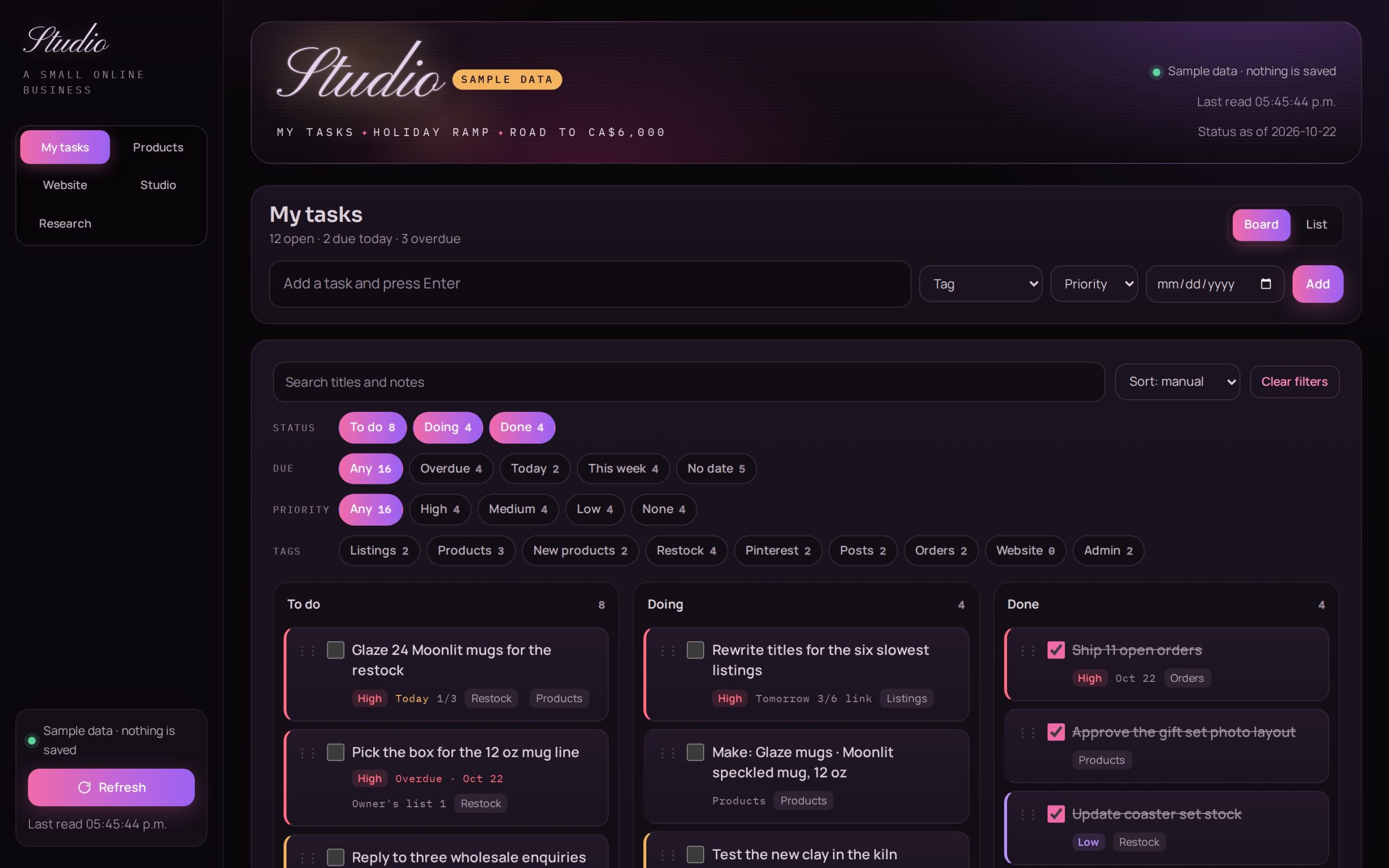
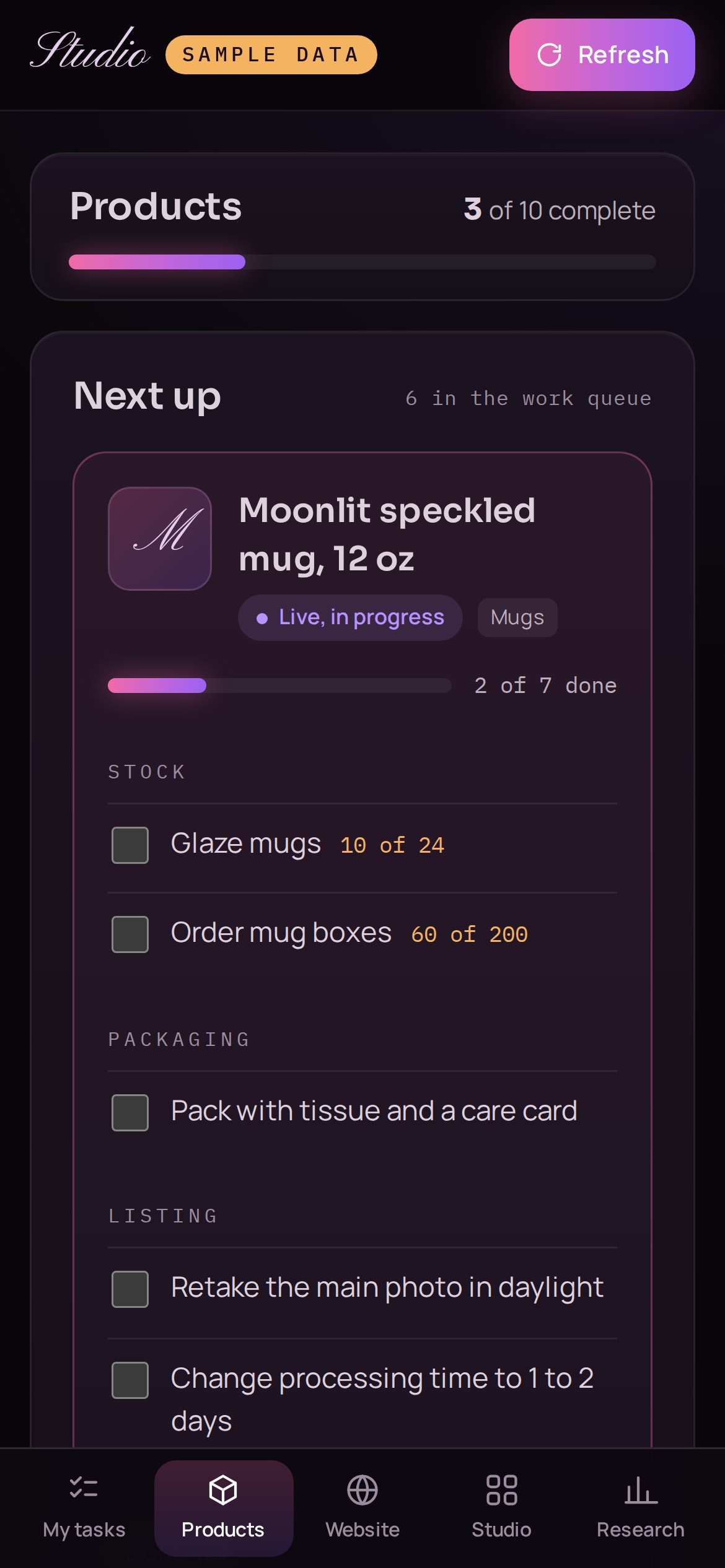
The tool she runs the shop from: five tabs, live data, and it opens on her own tasks.
The AI never got it right in one go. I reviewed every version and sent it back until it worked, then wrote each fix down as a rule with a check, so it can’t come back.
- What the AI builtWhat I changedThe rule
- What the AI builtA static page read from one fileWhat I changedA live database, a dark layout that works like an app, and a Refresh buttonThe ruleRules 1, 2, 4
- What the AI builtA tile that said “Cause not identified.” while the data said otherwiseWhat I changedStatus lines come from the data, never typed in by handThe ruleRules 5, 6
- What the AI builtOne long page with the team’s items firstWhat I changedTabs, and her own tasks firstThe ruleRules 7, 8
- What the AI builtPure white text and tight paragraphsWhat I changedSofter colours with measured contrast, and body text at 15pxThe ruleRule 9
- What the AI builtA Products tab with filters, card grids and counters on every itemWhat I changedOne view at a time, counters only where something gets counted, and ticks you can undoThe ruleRule 10
Version 11. I gave the website project its own tab, 31 steps in six phases, so it never mixes with her shop tasks.
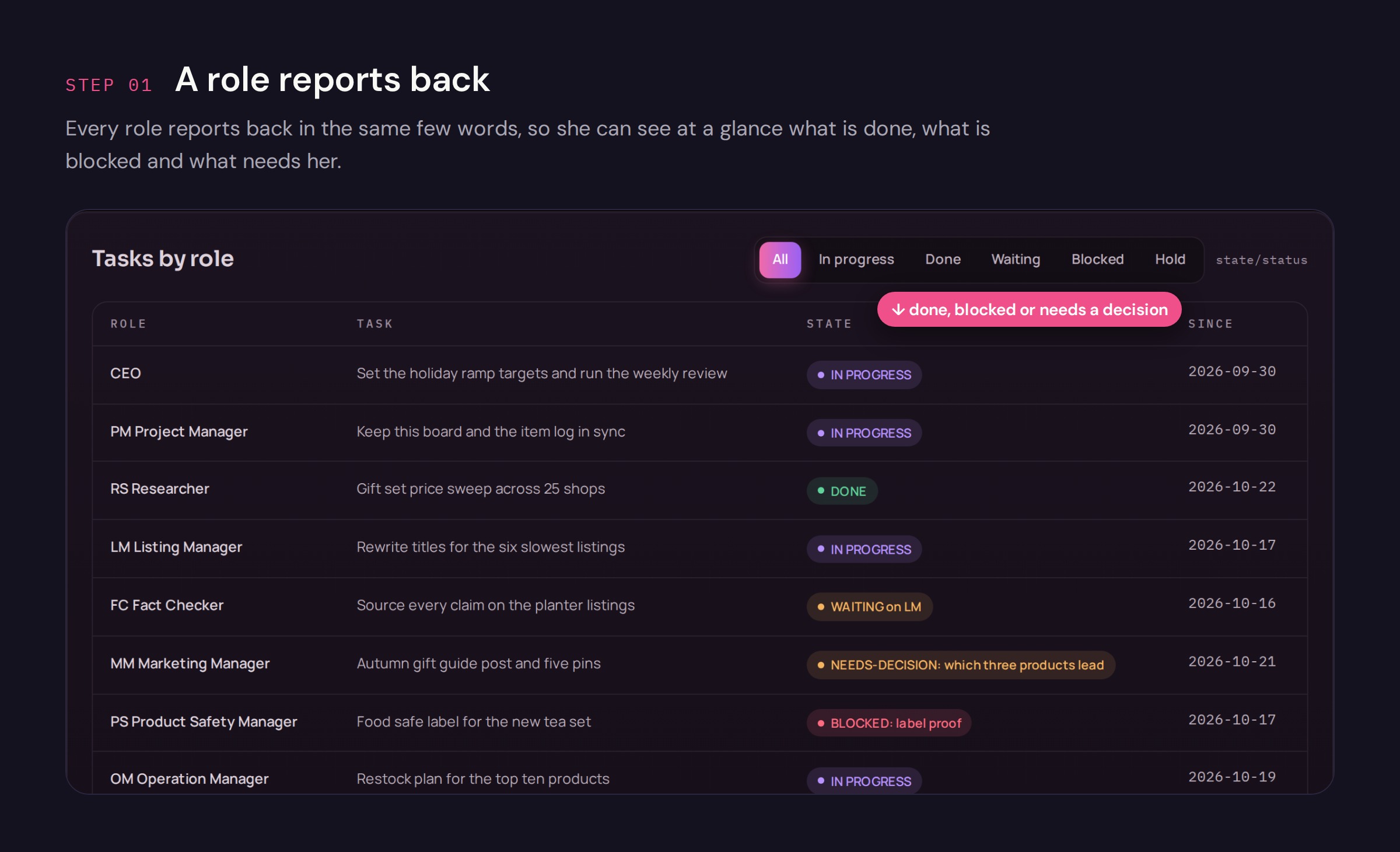
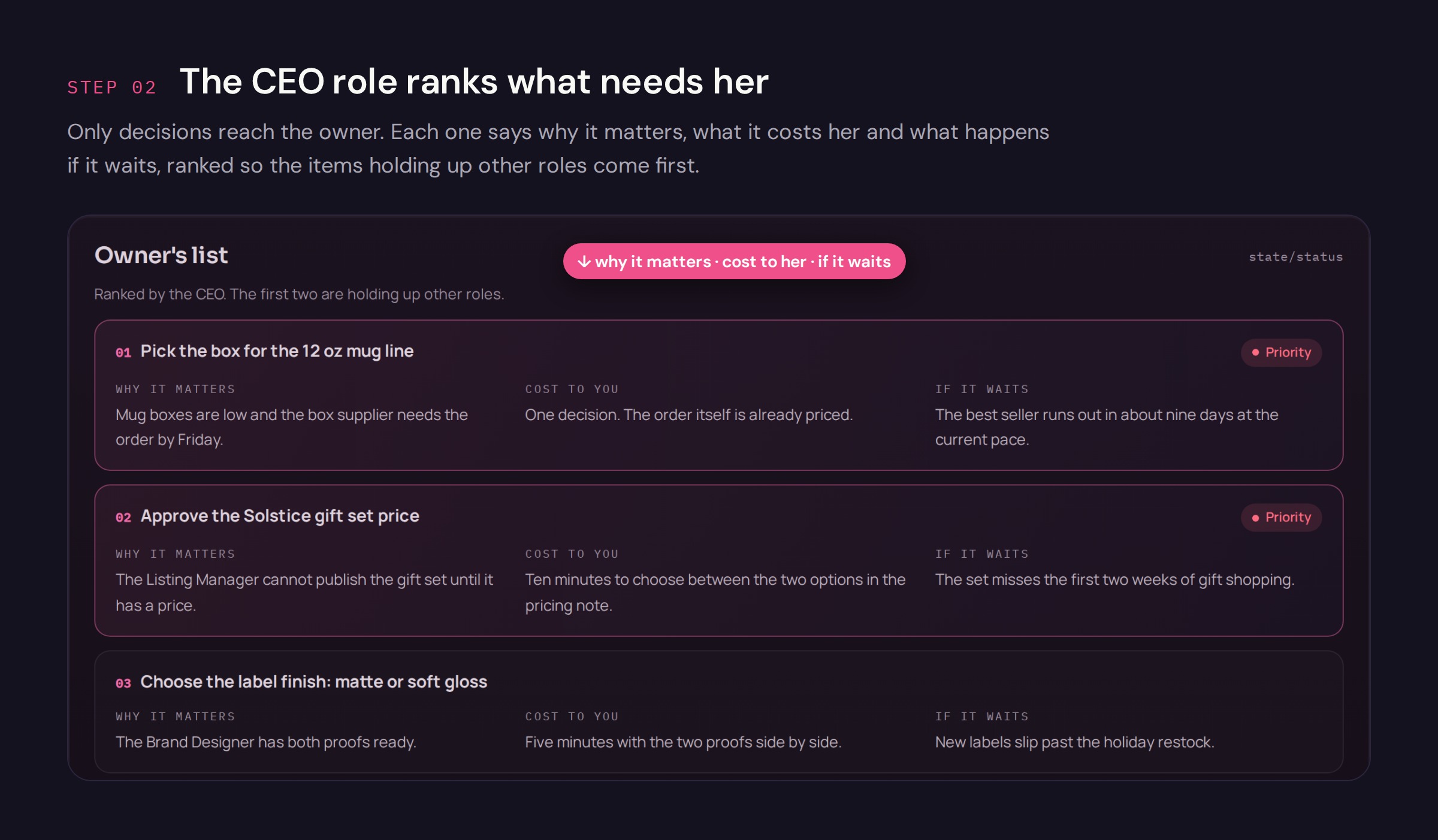
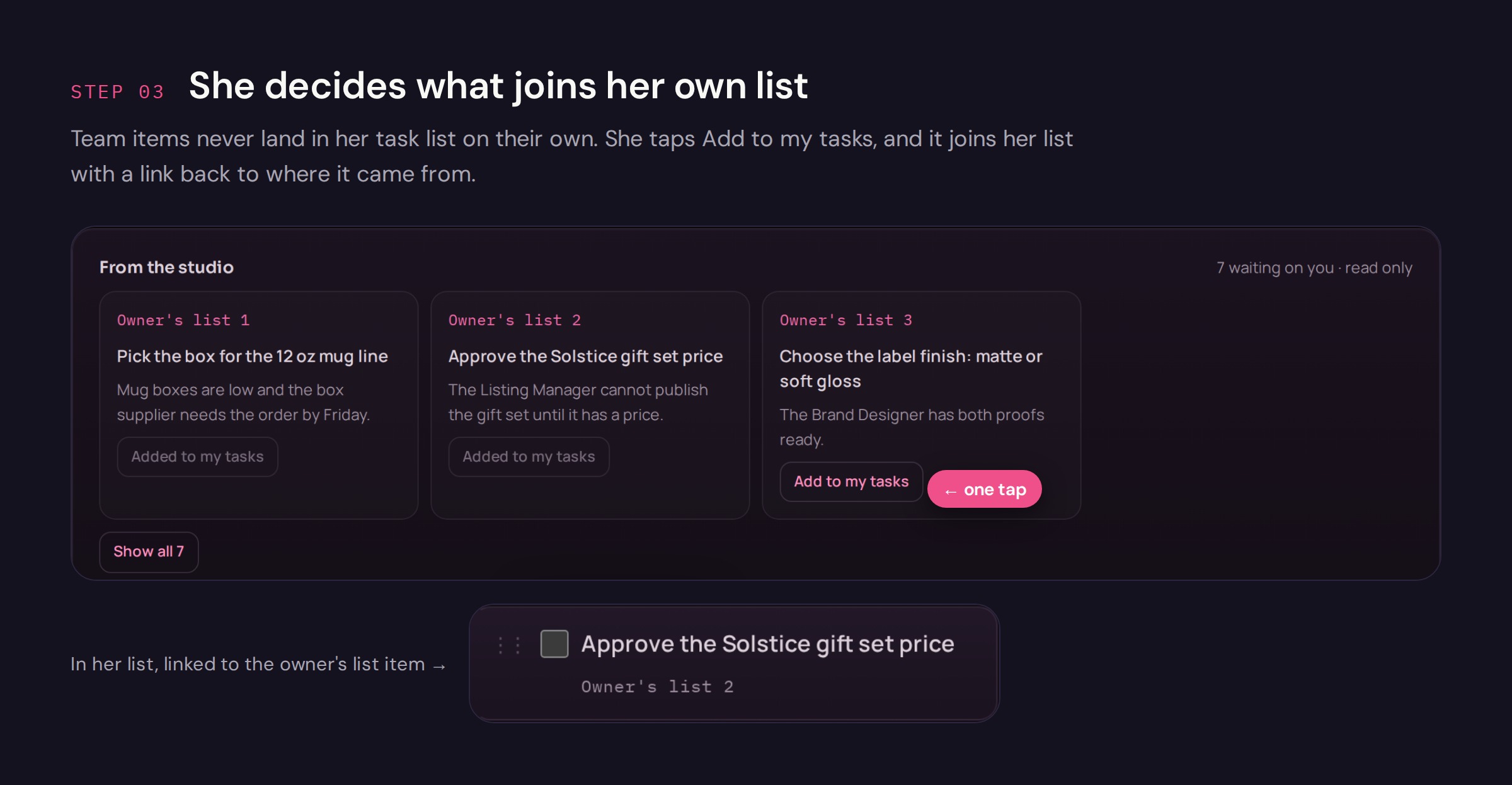
How a decision reaches her
What the team got done in its first month
- 43live listings rewritten to meet the marketplace’s policy, every active one
- 14new pieces priced in two days
- 16cards written for custom orders
- 192competitors tracked, 47 shops read in full
The team did the reading, writing and checking; she pasted every listing fix and sends every buyer reply herself.
I designed the team: every role’s job, its rules and how work moves between them. I designed the dashboard and built it with Claude: I set the structure, the layout and the 12 rules, a Project Manager role I set up wrote the code, and I reviewed all 16 versions and sent each back until it worked.
The roles find, draft and flag; she makes the calls.
Built inClaude: one shared project with a chat for each role, and a dashboard with its own database.
One person, every job
She makes, packs, lists and markets everything herself. Switching between jobs, not making, was the limit, and her shop stats were often weeks old.
- Notes appIts free plan was too limited
- Task appShe jumped back and forth
- Stock sheetCounts kept in a spreadsheet
- Shop statsTwo weeks old in mid September
- One dashboardHer tasks, products, website plan, studio and research, in five tabs
- Stats every MondayRead from her shop’s own stats pages, on a schedule
A dashboard that opens on her tasks
I designed and built it. She uses it every day. I reviewed every version and turned each fix into a written rule with a check that every new version must pass.
- 5 tabs
- 12 design rules
- 79product records, one checklist each
- 16versions, each checked on desktop and phone
(Counts from the dashboard, October 2026.)
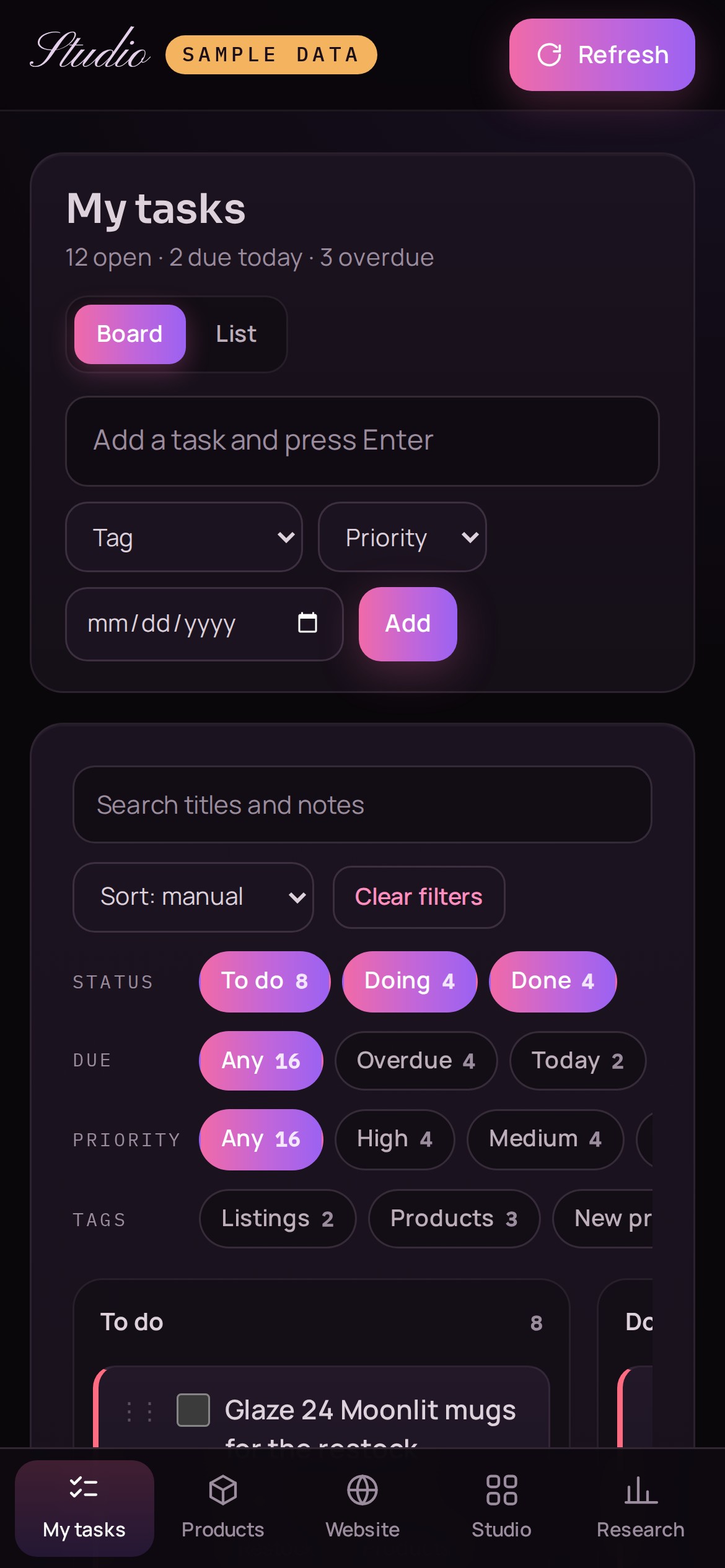
Dashboard for the client, with sample data in place of the shop’s figures. Every tab works; nothing you change is saved.
- A · DecisionHer tasks come first
The first tab is her own task list. Team items join it only when she taps “Add to my tasks”.
- B · DecisionOne checklist per product
Each product has four checks: what she still needs to decide, stock, packaging and the listing. Sold out items stay hidden until she adds them back.
- C · DecisionCharts only from real figures
One data point shows as one point, not a trend. Every status line comes from the data.
Added after I found the Products tab overwhelming to use. Each tab shows one thing, and every field means one thing.
Rule 9: no pure white text and body text 15px or larger, with contrast of at least 5.4:1 against the 4.5:1 WCAG AA asks for.
Each role is a chat with one job
A CEO role plans the work and hands it out. Every other role does one job, keeps its own files and reports back with done, blocked or needs a decision.
- Project Manager
- ResearcherMondays 9:00
- Listing Manager
- Fact Checker
- Marketing Manager
- Product Safety Manager
- Operation Manager
- Finance Manager
- Web Developer
- Brand Designer
- Note Keeper
- Technician
- Customer Service
- 01One writer per file
A map names who writes every file. It came after three kinds of lost work, such as a stale copy saved over newer edits.
- 02One browser at a time
Only the role assigned to it uses her logged in browser, and it notes when it starts and stops.
- 03Decisions stay decided
Once she decides something, it’s written down, and the team doesn’t reopen it unless something new comes up.
Is the marketplace hiding the shop?
First, the marketplace removed her best selling listing for a policy issue. The team flagged restricted keywords on her other listings, then read all 43 live listings and rewrote each one; she pasted every fix, so the rest of the shop wouldn’t be hidden or removed too. A few days later, with sales still slow, she asked the team this question.
No penalty on the shop as a whole. The drop started before the removal.
Visits had started falling about 12 days before the removal, across almost every listing. The removal was a second hit on top. Saves per visit held, so shoppers were still interested; fewer of them bought.
- 1Checked for a penalty
No warning, no new violation
- 2Cut the data into weeks
Monday to Sunday, visits by source
- 3Compared every listing
Two weeks against the two before
- 4Compared with last year
Last year dipped in the same weeks
- 5Found where it started
Across almost every listing, before the removal
Her recent price rises weren’t in the answer. The team checked live prices against a dated snapshot: the raised listings kept selling, so prices didn’t explain the fall.
New rule“List every price change before explaining any change in sales.”
Each mistake is written down as a rule
When something goes wrong, the team writes down what happened and a rule that stops it happening again. New roles are added the same way: only when a written condition is met.
The keyword tool guessed about 2.5 times as many sales as the shop really made. The Researcher caught it, and the team stopped using those guesses.
Roles are added only when needed: Customer Service came in when buyer messages took more than an hour a week.
- What went wrongRule written
- A listing was reported blocked. It was live.Check the live listing before giving her a task
- Two roles used the same browser at once.One browser holder at a time
- Conversion was called “back in range” when it wasn’t.Monday to Sunday weeks only; compare like with like
- A dashboard tile showed fixed text that contradicted the data.Status lines come from the data, never typed in by hand
- A sales answer left out recent price changes.List every price change first
What changed for her
One place for her work, and answers she can check against the numbers.
- Fresh stats every Monday
Her shop stats now arrive every Monday on their own, and her task app, notes app and stock sheet moved into one dashboard.
- Answers she can check
When sales dipped, the team checked for a penalty, compared every listing and last year, and showed where the drop started.
- She asks in her own words
She writes to the role she needs, in her own words.
“When sales dipped, I used to have no idea why. Now it checks the numbers and every listing each week, shows me the problem and how to fix it, and I just tell it what I need instead of juggling three apps.”
Name withheld at the client’s request.